String Instrument Tuner
A downloadable tool
Instrument Tuner
A clean, browser-based tuner for guitar, bass, violin, ukulele, and chromatic pitch checking. It will run on Desktop for now.
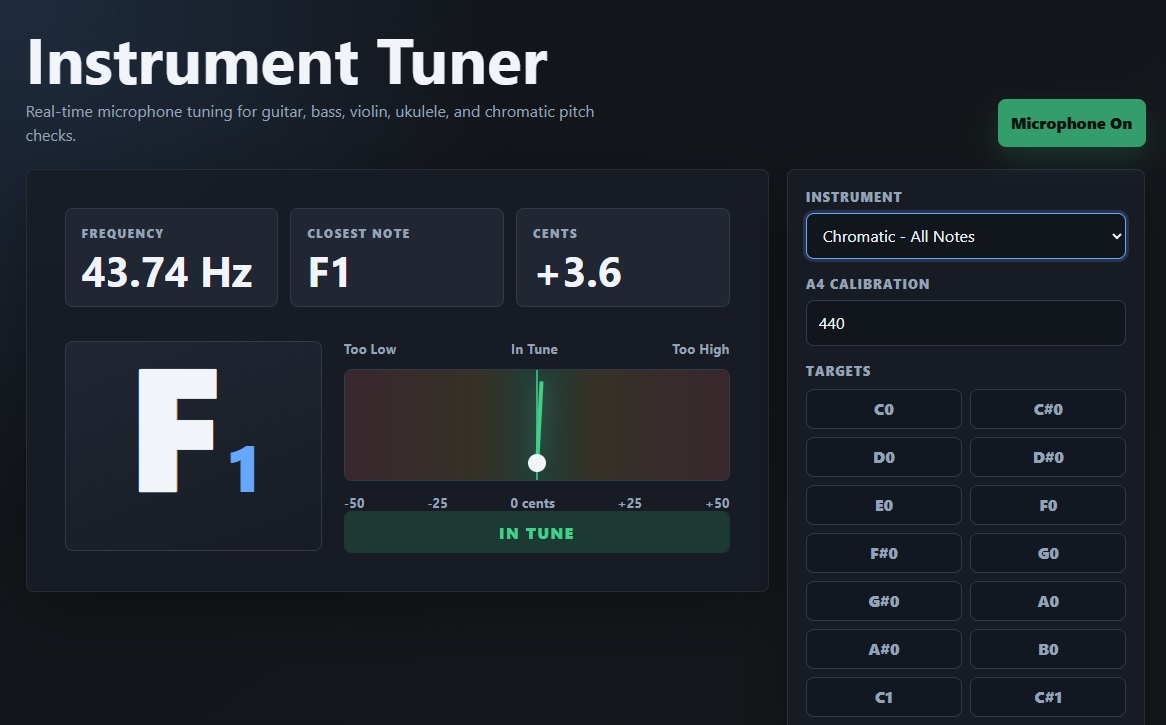
Short description: Instrument Tuner is a local web app that uses your microphone to detect the pitch of a played note in real time. It shows the detected frequency, closest musical note, octave, cents difference, and a clear visual tuning meter so musicians can quickly tune common string instruments or check any note chromatically.
Overview
Instrument Tuner is designed for musicians who want a fast, readable, no-install tuning tool that runs directly in a modern web browser. The app listens through the device microphone, estimates the dominant frequency of a sustained note, compares it against a calibrated musical note table, and displays whether the note is too low, in tune, or too high.
The interface is simple enough for quick practice-room use while still showing useful technical feedback such as frequency in hertz and cents offset from the nearest target pitch.
Key Features
| Feature | Description |
| Real-time microphone tuning | Uses the browser microphone to listen to a played note and update the tuning display continuously. |
| Dominant frequency detection | Analyzes the incoming audio signal to estimate the fundamental pitch of a single sustained note. |
| 10-octave note table | Compares detected pitch against a generated musical note table covering ten octaves. |
| Instrument presets | Includes target tunings for guitar, bass, violin, and ukulele. |
| Chromatic mode | Allows tuning or checking any note instead of limiting detection to a specific instrument preset. |
| A4 calibration | Lets the user adjust the reference pitch, with a default of A4 = 440 Hz. |
| Visual tuning meter | Shows whether the pitch is flat, centered, or sharp using a clear meter needle. |
| Detailed pitch readout | Displays detected frequency, closest note, octave, and cents difference. |
| Runs locally | All code is contained in one HTML file. No external libraries, installation, or internet connection are required after the file is available. |
Supported Tuning Presets
- Guitar: E2, A2, D3, G3, B3, E4
- Bass: E1, A1, D2, G2
- Violin: G3, D4, A4, E5
- Ukulele: G4, C4, E4, A4
- Chromatic: all notes in the app's 10-octave table
How to Use the Tuner
- Open the app: Open the tuner HTML file in a modern browser such as Chrome, Edge, Firefox, or Safari.
- Start the microphone: Click the Start Microphone button.
- Allow permission: When the browser asks for microphone access, choose Allow.
- Select an instrument: Choose Guitar, Bass, Violin, Ukulele, or Chromatic mode from the instrument menu.
- Play one note: Pluck or bow one string clearly and let it ring. Avoid playing chords while tuning.
- Read the display: The app shows the detected frequency, closest note, octave, cents difference, and tuning status.
- Adjust the instrument: Tighten or loosen the string until the status reads In Tune and the meter needle is centered.
- Repeat for each string: Continue through the remaining strings in the selected preset.
Understanding the Display
Detected Frequency
This is the measured pitch of the sound coming into the microphone, shown in hertz. For example, A4 is normally 440 Hz when standard calibration is used.
Closest Note and Octave
The app finds the nearest musical note to the detected pitch. The note name and octave tell you which pitch the tuner thinks you are playing, such as E2, A4, or G3.
Cents Difference
Cents measure how far the detected pitch is from the target note. A value near 0 means the pitch is very close. Negative values mean the pitch is too low, and positive values mean it is too high.
Tuning Meter
The tuning meter gives a quick visual guide. If the needle leans left, the note is too low. If it leans right, the note is too high. When the needle is centered, the note is in tune.
Status
- Too Low: The pitch is flat. Tighten the string slightly.
- In Tune: The pitch is close enough to the target note.
- Too High: The pitch is sharp. Loosen the string slightly.
A4 Calibration
The app defaults to the common standard of A4 = 440 Hz. Some musicians, ensembles, or recordings may use a different reference pitch, such as 432 Hz or 442 Hz. The A4 calibration control lets you change the reference pitch, and the entire note table updates automatically.
Best Results
- Tune in a quiet environment with minimal background noise.
- Play one string or note at a time.
- Let the note sustain for a moment so the tuner can stabilize.
- Place the instrument reasonably close to the microphone.
- Use Chromatic mode when checking notes outside the included instrument presets.
- If the browser blocks microphone access from a local file, run the app through a simple local server and open it from localhost.
Technical Notes
The tuner uses the Web Audio API to capture live microphone input. It analyzes the time-domain audio signal with an autocorrelation-based pitch detection method, which compares the signal against delayed copies of itself to estimate the repeating period of the waveform. That period is converted into frequency, then compared against the calibrated note table to calculate the closest note and cents difference.
Privacy
The tuner runs locally in the browser. Microphone audio is used only for live pitch analysis inside the app and does not need to be uploaded to a server.
Document prepared as an app description and user guide for the Instrument Tuner web app.
Purchase
In order to download this tool you must purchase it at or above the minimum price of $2.25 USD. You will get access to the following files:
Leave a comment
Log in with itch.io to leave a comment.